
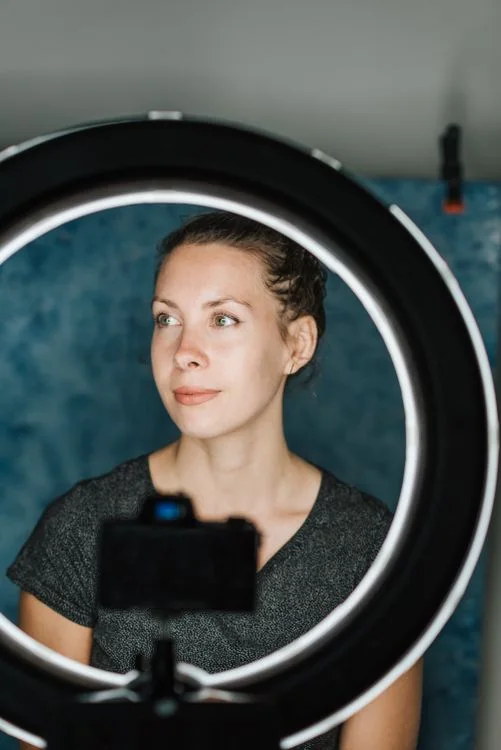
A photo is the first thing the eye lands on in a resume, before the name or job title. A good picture makes the document feel personal and helps a recruiter remember you. A bad one distracts from your experience and makes the application look careless, even when the content is strong.
This guide covers whether a resume needs a photo at all, which professions and countries expect one, what the picture should look like and how to take it yourself without a photographer.
Do you need a photo on your resume
In Ukraine a photo is optional but common, and most recruiters see it as neutral or positive. A resume will not be rejected just because it has no photo, while a poor photo can hurt you. The rule is simple: no photo is better than a bad one.
| Situation | Photo | Why |
|---|---|---|
| Customer-facing roles: receptionist, sales assistant, waiter, manager | Recommended | The employer cares how you represent the company |
| Public roles: host, trainer, teacher, PR | Recommended | Appearance is part of the job |
| Office and technical roles: accountant, developer, analyst | Your choice | Decisions are based on skills and experience |
| The job ad asks for a "resume with photo" | Required | Otherwise your resume may not be considered |
| Jobs in the US, Canada, the UK or Ireland | Leave it out | A photo can open the employer to discrimination claims, so they ask candidates not to send one |
| Germany, Austria, Poland, Switzerland | Often included | A resume photo is common practice |
Resume photo requirements
A resume photo is neither a social media avatar nor an ID picture. It should be professional but natural: someone people would enjoy working with.
- A head-and-shoulders or chest-up portrait, with your face taking up about half the frame.
- Eyes on the camera with a light natural smile or a calm, friendly expression.
- A plain light or neutral background with no objects behind you.
- Even, soft lighting without harsh shadows; daylight from a window works best.
- Clothes you would wear to an interview at that company.
- A recent picture, no older than 1–2 years, so you are recognisable at the meeting.
- Good quality: sharp, at least 400×400 pixels, no pixelation.
What to wear for the photo
Follow the company's dress code rather than a generic "business style". A blazer suits a banker or a lawyer; a neat sweater or a plain shirt suits a designer or a barista.
| Field | What works |
|---|---|
| Finance, law, public sector | Blazer, shirt or blouse, muted colours |
| Sales, service, administration | Shirt, blouse, plain jumper |
| IT, marketing, design | Neat polo shirt, sweater, shirt without prints |
| Manual trades, logistics, warehouse | Clean plain clothes or a company uniform |
Avoid bright prints, large logos, low necklines and clothes the same colour as the background, or your outline will blend into it.
How to take a resume photo with your phone
You do not need a professional photographer. A modern smartphone and 15 minutes are enough if you follow a few rules.
- 1Find the background and light
Stand facing a window next to a plain light wall. Avoid direct sunlight and overhead lamps, which cast harsh shadows.
- 2Ask someone to take the picture
An arm's-length selfie distorts facial proportions. If nobody can help, put the phone on a tripod or a stack of books and use the timer.
- 3Keep the camera at eye level
Shots from below or above look unnatural. Use the main camera rather than the front one, and portrait mode if your phone has it.
- 4Take 20–30 shots
Vary the angle of your head and your expression. It is easier to find a natural one among many shots.
- 5Crop and check
Crop to the shoulders and leave a little space above your head. Look at the photo at a small size, the way a recruiter will see it on your resume.
Common photo mistakes
| Mistake | How to fix it |
|---|---|
| A holiday, party or wedding photo | Take a separate picture against a neutral background |
| A cropped group photo with someone else's shoulder in the frame | Use an individual portrait only |
| A selfie in a car, mirror or lift | Ask someone to take the photo or use the timer |
| Sunglasses, a hat or a hood | Your face should be fully visible |
| Heavy filters, skin smoothing, masks | Minimal edits only: brightness, contrast, cropping |
| An ID photo with a tense expression | A natural expression and a light smile |
| A picture from 10 years ago | A photo no older than 1–2 years |
| A blurry or dark image | Daylight and the phone's main camera |
Where to place the photo and which format to use
- Place the photo at the top of the resume, in the header next to your name or in the sidebar.
- Size it at roughly 3×4 cm or a circle 3–4 cm across. A large photo takes space better given to your experience.
- Send your resume as a PDF: the photo is embedded and will not shift the way it can in Word.
- Do not send the photo as a separate file unless asked.
- Check the PDF size: if it is over 2–3 MB, reduce the photo resolution.
Can you use an AI-generated photo
Services that turn a selfie into a "professional headshot" are popular, but it is easy to overdo them. If you look different at the interview than in the photo, it undermines trust. Light edits are fine: removing the background, evening out the light, cropping. Changing your features, age or hairstyle is not.
Resume photo checklist
Conclusion
A resume photo is optional but useful when the picture is good and fits the job. A neutral background, daylight, neat clothes and a natural expression are enough to make the photo work for you rather than against you.
Add a photo and build your resume in the [Rezume.org.ua builder](https://rezume.org.ua/en): choose a template with a photo, crop the picture in the editor and download a PDF.
Frequently asked questions
No. In Ukraine a photo is optional unless the job ad asks for one. It is recommended for customer-facing and public roles.
Better not. ID photos usually look tense and formal. Take a separate picture with a natural expression.
Colour is the standard. Black and white is fine if it is good quality and suits the template design, but colour looks more lively.
It depends on the country. In the US, Canada and the UK, leave it out. In Germany, Austria and Poland it is often included. See our English CV guide for more on international resumes.
Only if it is a professional portrait against a neutral background. Cropped holiday or event photos do not work.
Resume examples by profession
Explore resume examples for accountants, drivers, administrators, and other professions.